
Data Doesn’t Have to Be Difficult

Luka Jasionyte, from the marketing team at Snap Analytics, catches up with Tim Andrews, Head of Data Visualisation, to dive into his passion for data, spotlight emerging trends, tackle enterprise challenges, and uncover what truly drives client success. 

What inspired you to get into data and analytics, Tim? 

Solving problems has always motivated me. From a young age, I felt comfortable working with data sets and searching for insights that could make a difference. Turning raw information into something meaningful and actionable has always fascinated me. Helping to move the needle on complex business challenges is still exciting today. What I enjoy most is being part of something innovative, especially when we achieve what others thought was impossible. 

What is the most exciting trend right now?   

There is still a way to go, but I think the combination of AI, cloud data warehouses and modern analytics applications will mean much quicker time to insights and a more conversational style to solving business problems. This shift is making analytics more accessible, allowing decision-makers to interact with data in ways that feel natural and intuitive. It is not just about speed, but about enabling better collaboration and reducing the complexity that often slows progress. As these technologies mature, they will transform how organisations approach strategy and execution, creating a stronger link between data and real business outcomes. 

What are some common data-related challenges that large enterprises typically face?   

Large enterprises often face several recurring challenges with data. Processes frequently generate poor-quality data, making it difficult to use for analytics later on. There is often a lack of clear data ownership within the business, which leads to gaps in accountability and governance. Many organisations also struggle with insufficient skills to solve complex data problems effectively. Business subject matter experts rarely have enough time to contribute to data and analytics projects, which slows progress. Finally, there is a common lack of understanding about the importance of strong foundational data and business context when tackling advanced analytics or AI initiatives. Without these basics, even the most advanced tools cannot deliver the expected results. 

What are the top client priorities for those looking to drive successful outcomes in data and analytics?   

Clients who want to achieve successful outcomes in data and analytics tend to focus on a few key priorities. First, identifying the right projects is essential, particularly those with clear business value and strong potential for user adoption. Second, working with partners who can deliver high-quality, robust solutions that meet the brief on both outcomes and cost is critical. Finally, making it easier for the business to solve complex problems and maximise the use of existing technology ensures that investments translate into measurable results. 

Why Snap Analytics? 

I tell my delivery team that our goal is simple: to become our clients’ favourite partner. We achieve this by being innovative, accountable, transparent and trustworthy in everything we do. I believe we are living up to that ambition and continue to strive for excellence every day.

Into the Matrix: Mastering Conditional Formatting in Power BI

Introduction

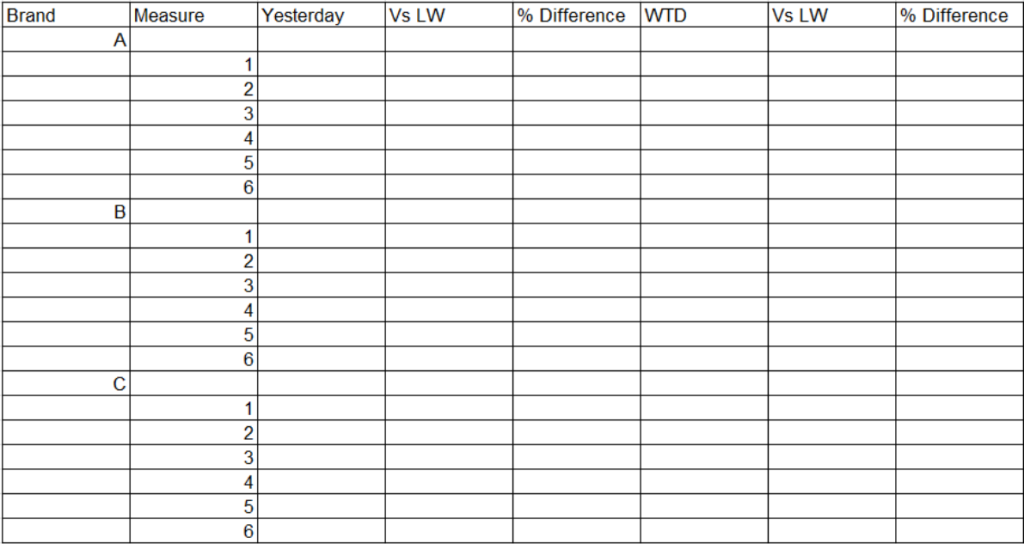
In the world of data viz, creating a clear and informative matrix can often be a daunting challenge. Recently, I was tasked with developing a complex matrix in Power BI to display various brands alongside their key performance indicators (KPIs). This report required six measures for each brand and several time intelligence calculations – such as yesterday’s figures and week-to-date comparisons. Therefore, ensuring a cohesive and consistent visual style became a challenge. Adding to the complexity, I had to ensure that the conditional formatting aligned with that of previous reports for the same client.  

In this post, we’ll explore how to build a matrix visual that pivots values to rows, groups them by dimensional hierarchies, whilst performing conditional formatting on our columns, which in this example, are calculated time intelligence measures. 

The Challenge

As I began to set up the matrix, I quickly ran into a significant obstacle: Power BI’s default settings only allowed conditional formatting on the values section of the matrix. This limitation became frustrating when I pivoted the data to display KPIs as rows, causing the conditional formatting to be incorrectly applied along the horizontal axis instead of the intended vertical columns. My efforts to create a visually appealing and informative matrix were hampered by these constraints, and I needed to find a way to implement the conditional formatting rules effectively while preserving the integrity of the data presentation. 

Exploration of Alternatives

In my quest for a solution, I initially considered hard coding the conditional formatting directly into the time intelligence columns. Using DAX formula, I was able to display up or down arrows based on the calculated values. While this approach worked for the “TW Vs LW” columns, it proved inadequate for the “% change” columns, limiting the overall functionality of my matrix. 

Additionally, formatting the values in the DAX query led to performance issues, significantly slowing down the report. I quickly realised that this method did not align with the existing aesthetics of my report pack, further complicating my efforts. 

To enhance readability, I explored splitting the matrix into six separate matrices. One for each KPI, with countries as rows and individual measures for each time-period. This solution worked remarkably well for mobile viewing, allowing users to easily access all KPIs, brands, and time periods in a more digestible format when using devices in portrait mode. However, this approach was less ideal for desktop users, as navigating between six matrices became cumbersome and disrupted the seamless experience I intended to deliver. 

Breakthrough Solution

After identifying the challenges in presenting a cohesive matrix with effective conditional formatting, I adopted a systematic approach to streamline the data structure and enhance the visual representation of KPIs across different brands. 

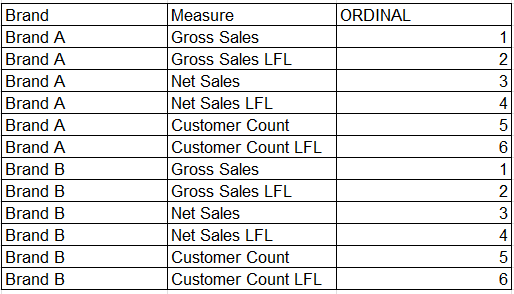
1. Creating the Source Table: I initiated the solution by developing a new source table in Excel. This table organised essential measures associated with various brands, accompanied by an ordinal column to facilitate the correct sequencing of KPIs. This structured layout not only simplified data management but also allowed for straightforward integration with existing data models. For example: 

2. Establishing Relationships: To ensure seamless data interaction, I joined this new source table to the store dimension table using a cross-directional, many-to-many relationship based on the brand name. Although many-to-many relationships are generally avoided in Power BI due to potential complexity, they work in this case because the source table’s pre-aggregated KPIs and distinct brand names ensure efficiency and clarity in the model. This configuration maximised flexibility in how data could be accessed and analysed across the two tables. 

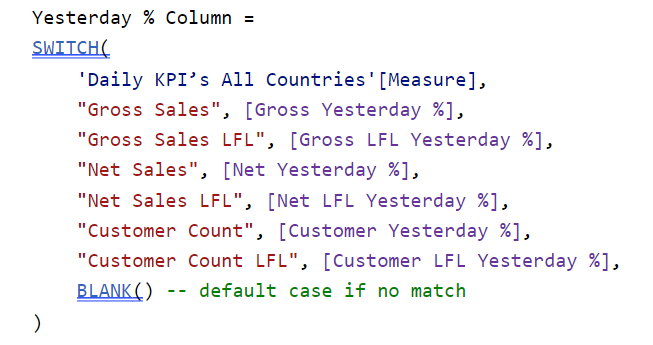
3. Implementing Calculated Columns: Utilising a SWITCH() statement, I created calculated columns that enabled dynamic switching between the measures in the source table and the corresponding measures in the data model. A SWITCH() statement in DAX evaluates an expression against multiple conditions and returns the corresponding result for the first match. This approach allowed for targeted calculations based on specific KPIs while maintaining clarity in data representation. 

4. Developing Measures: Building on the calculated columns, I developed measures to sum the values required. This was essential for ensuring accurate aggregations, providing a comprehensive view of performance metrics across all brands and time periods. For example: 

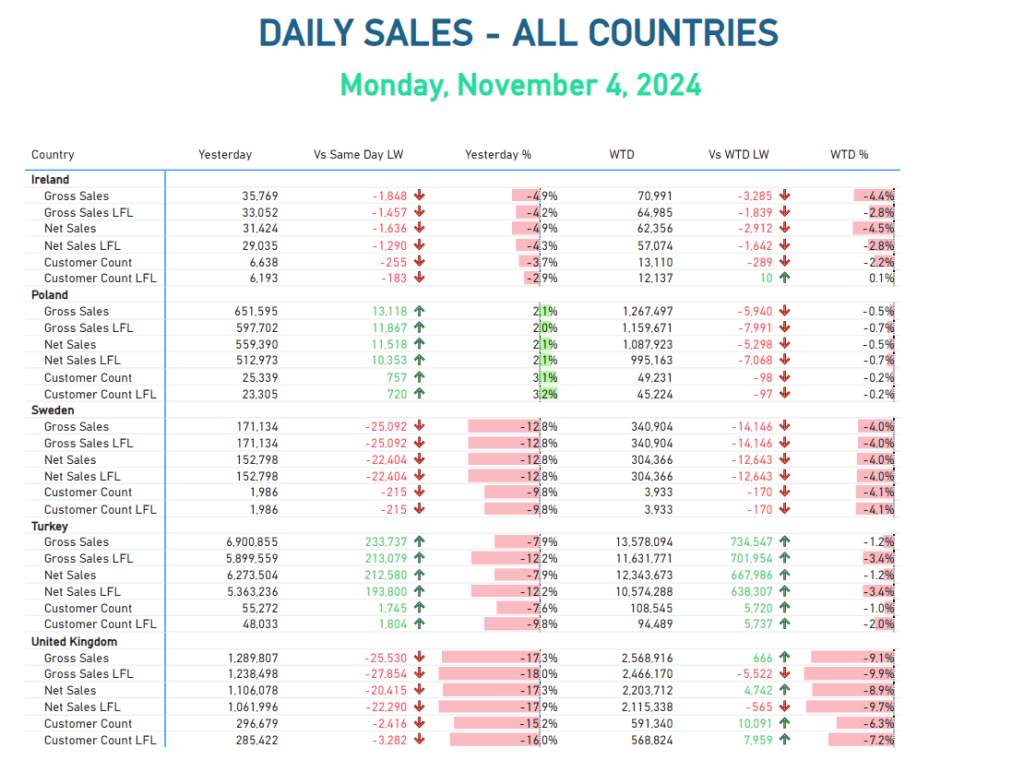
5. Applying Conditional Formatting: With the measures established, I leveraged Power BI’s built-in conditional formatting rules to enhance visual clarity. This consistency in formatting not only aligned with the existing report pack but also facilitated stakeholders in quickly identifying trends and insights. 

This solution not only resolved the immediate technical challenges but also enhanced the overall user experience for those engaging with the reports. The dynamic calculations enabled by the calculated columns ensure that the reports remain relevant and insightful, catering to the business’s evolving needs. Additionally, the focus on consistent formatting facilitates the identification of critical patterns, a fundamental concept in Data-Viz best practices. 

Conclusion 

By combining thoughtful data modelling and conditional formatting, we can transform raw data into actionable insights, empowering informed decision-making among various stakeholders. As we continue to navigate the complexities of data analysis, this approach serves as a valuable blueprint for future projects, ensuring our reporting remains insightful and adaptable to shifting business landscapes. 

I encourage you to apply this method in your own reports and experience the improvements in your workflow!